Python Libraries for DevOps
I'm Suraj Barik Aspiring DevOps Engineer with Hands-on experience in Automating,Shell Scripting, Supporting in AWS, management, CI/CD, and DevOps processes.
Reading JSON and YAML in Python
As a DevOps Engineer, you should be able to parse files, be it Txt, json, yaml, etc.
You should know what libraries one should use in Python for DevOps.
Python has numerous libraries like
os,sys,json,yamletc that a DevOps Engineer uses in day-to-day tasks
Tasks:
- Create a Dictionary in Python and write it to a JSON File.
import json

# Create a dictionary
data = {
    'name': 'Suraj Barik',
    'age': 24,
    'city': 'Bengaluru'
}

# Write the dictionary to a JSON file
with open('data.json', 'w') as file:
    json.dump(data, file)
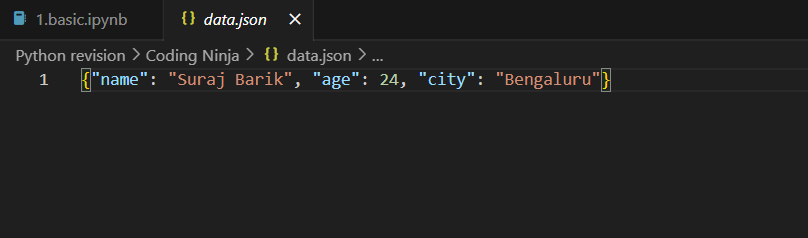
In the above example, we first create a dictionary called data with some key-value pairs. Then, we use the json.dump() function to write the dictionary to a JSON file named data.json. The file is opened in write mode ('w'), and the json.dump() function serializes the dictionary and writes it to the file.
After running this code, you will have a JSON file named data.json containing the dictionary in JSON format.
- Read a JSON file
services.jsonkept in this folder and print the service names of every cloud service provider.
output

aws : ec2
azure : VM
gcp : compute engine
here's an example of how to read a JSON file in Python and print the service names of every cloud service provider:
import json

# Read the JSON file
with open("service.json", "r") as f:
    data = json.load(f)

# Extract the service names for each provider
for provider, services in data.items():
    print(f"{provider}: {services['service']}")
In this example, we first open the file services.json in read mode and use the json.load() function to load its contents into a Python object called data.
The data object is a dictionary where each key represents a cloud service provider, and the corresponding value is another dictionary containing information about their services. To extract the service name for each provider, we iterate over the key-value pairs in data using a for loop.
For each provider, we print the provider's name followed by the value associated with the key "service" in their corresponding dictionary. This should produce output that looks like this:
aws: ec2
azure: VM
gcp: compute engine
- Read YAML file using python, file
services.yamland read the contents to convert yaml to json
here's an example of how to read a YAML file in Python, and then convert it to JSON:
import yaml
import json

# Read the YAML file
with open("services.yaml", "r") as f:
    data = yaml.safe_load(f)

# Convert YAML to JSON
json_data = json.dumps(data)

# Print the JSON data
print(json_data)
In this example, we first open the file services.yaml in read mode and use the yaml.safe_load() function to load its contents into a Python object called data.
The data object is a dictionary where each key represents a cloud service provider, and the corresponding value is another dictionary containing information about their services.
To convert the data object to JSON format, we use the json.dumps() function, which converts a Python object to a JSON-formatted string.
Finally, we print the JSON data using the print() function. This should produce output that looks similar to the following:
{
    "aws": {
        "service": "ec2",
        "description": "Elastic Compute Cloud"
    },
    "azure": {
        "service": "VM",
        "description": "Virtual Machines"
    },
    "gcp": {
        "service": "compute engine",
        "description": "Compute Engine"
    }
}
Hope this Python article has been helpful. ✌️👀 Thanks for reading!!