Kubernetes Architecture

I'm Suraj Barik Aspiring DevOps Engineer with Hands-on experience in Automating,Shell Scripting, Supporting in AWS, management, CI/CD, and DevOps processes.
Kubernetes Overview
What is Kubernetes?
Kubernetes also known as K8s(K8s as an abbreviation results from counting the eight letters between the "K" and the "s") was built by Google based on their experience running containers in production. It is now an open-source project and is arguably one of the best and most popular container orchestration technologies out there.
To understand Kubernetes, we must first understand two things – Container and Orchestration.
Containers:
Containers are completely isolated environments, as in they can have their processes or services, their network interfaces, and their mounts, just like Virtual machines, except that they all share the same OS kernel.
Orchestration: It is a technique that refers to the automated management and deployment of containerized applications across a clustered environment.
Kubernetes:
Kubernetes is known for its powerful orchestration capabilities, which enable the efficient operation of containerized workloads in a distributed environment.
What are the benefits of using k8s?
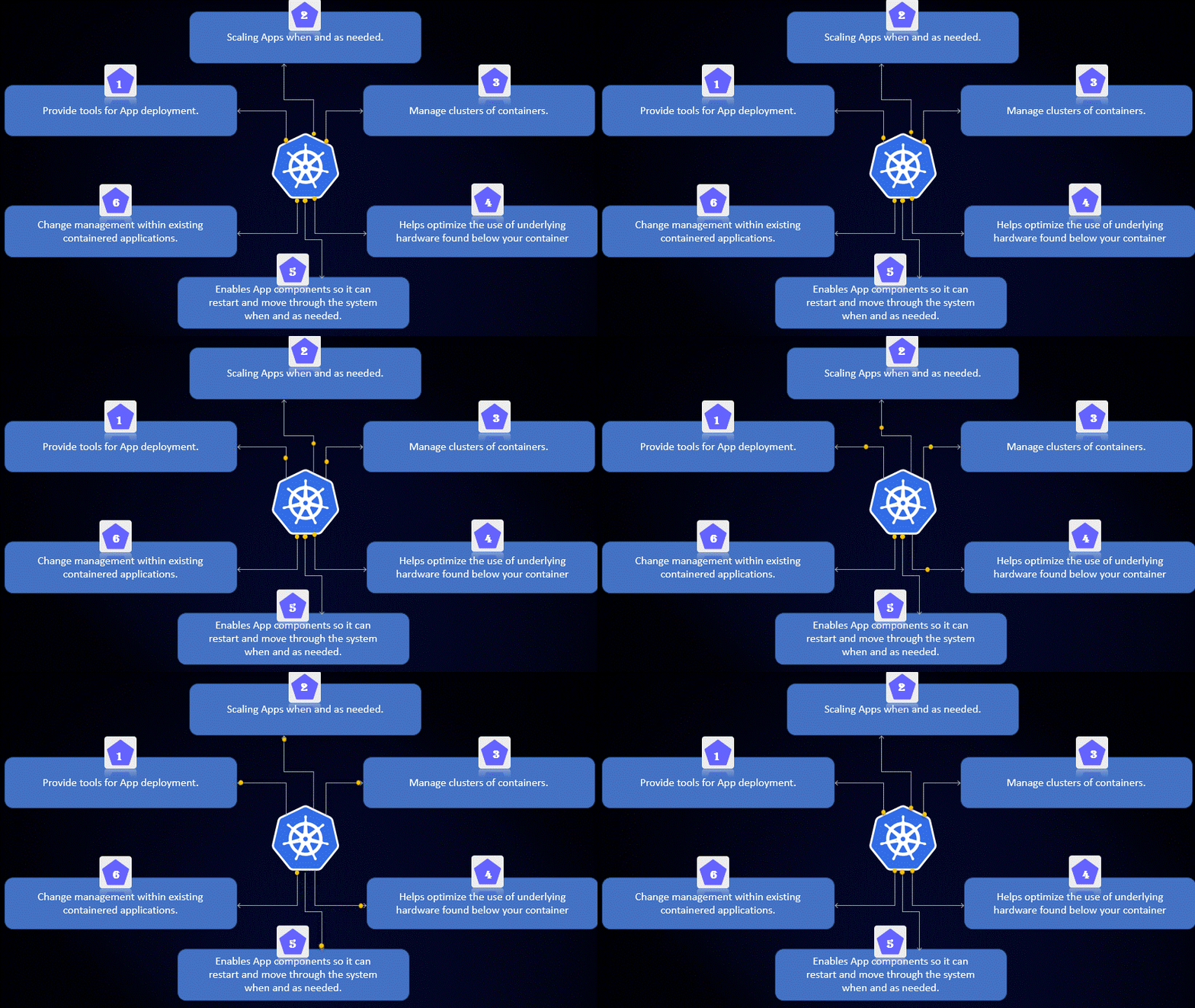
Scalability:K8s allows you to easily scale your application up or down by adding or removing containers as needed. This makes it easier to manage large applications and handle sudden spikes in traffic.High availability:K8s provides automatic failover and rescheduling of containers if a node fails, ensuring high availability of your application.Portability:K8s allows you to deploy your application on any cloud provider or on-premise infrastructure, making it easier to move your application between different environments.Automation:K8s automates many tasks such as deployment, scaling, and self-healing, reducing the manual effort required to manage your application.Resource efficiency:K8s optimizes the use of resources by scheduling containers on nodes with available resources, ensuring that resources are used efficiently.Security:K8s provides several security features such as network policies, secure communication between containers, and role-based access control (RBAC), making it easier to secure your application.
What Kubernetes can do?
Explain the architecture of Kubernetes🚀
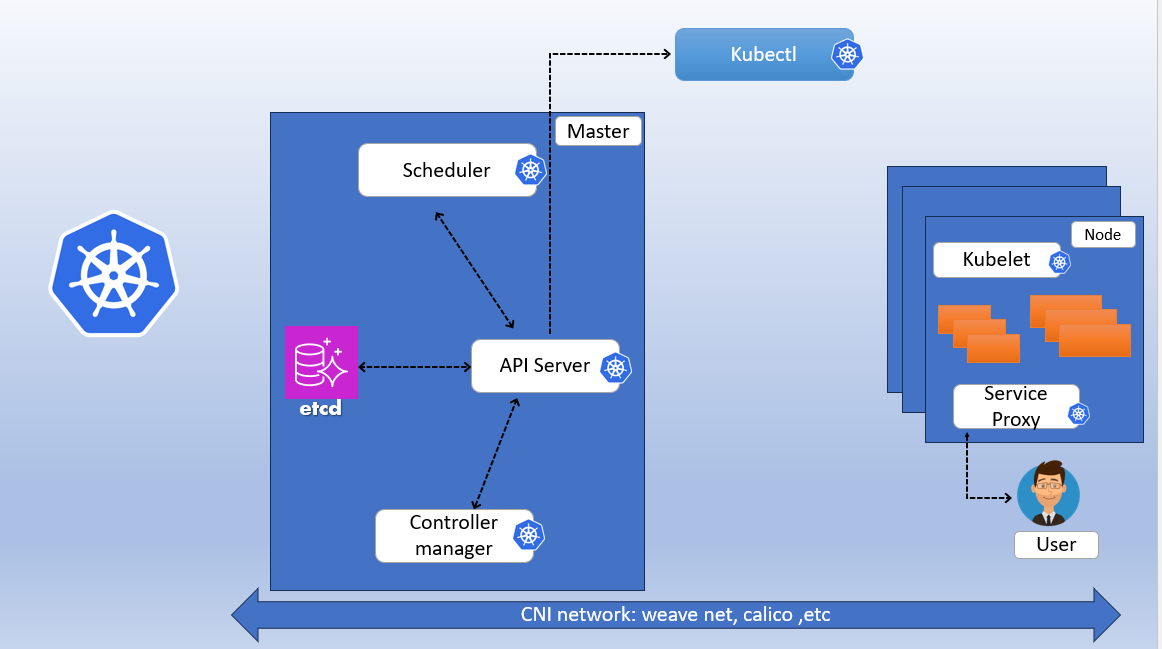
What is a Control Plane?🚀
In Kubernetes (K8s), the Control Plane refers to the set of components that manage and control the overall behavior of the Kubernetes cluster. The Control Plane includes several components that work together to provide the necessary functionality for K8s to operate effectively, including:
1. Kube-API server (For all communication)
This API server interacts directly with the user (i.e. we apply .yml or json manifest to kube-Apiserver)
2. ETCD Cluster
Stores metadata and status of Cluster.
ETCD is a consistent and high-available store (Key-value store)
Source of touch for cluster state (info about the state of the cluster)
3. Kube-Scheduler
Responsible for scheduling the pods on the nodes.
It just decides which pod to place on which node band on the CPU, RAM, and resources on the Node.
Kubelet places the nodes after the scheduler decides.
The right container/pod is sent to the right snip/node.
4.Kube-Controller Manager
Continuously monitor various components of the cluster and works toward managing/restoring to the desired state.
5. Kubelet
kubelet is the agent that runs on each node in the cluster. The agent is responsible for making sure that the containers are running on the nodes as expected
6. Service Proxy
This component manages the network and the ports exposed outside the cluster for users.
6. Pods
A POD is a single instance of an application. A POD is the smallest object, that you can create in Kubernetes.
Write the difference between kubectl and kubelet
Kubectl:
stands for “Kubernetes Command-line interface”. It is a command-line tool for the Kubernetes platform to perform API calls.
You can use Kubectl to deploy applications, inspect and manage cluster resources, and view logs. kubectl is the primary means by which a developer can interact with a Kubernetes cluster. kubectl is typically run on a client machine outside of the K8s cluster,
Kubelet
Kubelet is the technology that applies, creates, updates, and destroys containers on a Kubernetes node.
Every worker node in a Kubernetes cluster will have an instance of Kubelet running. When it’s time to create a pod and container(s), mechanisms in the Kubernetes controller node inform an instance of Kubelet running on a particular worker node to interact with the node’s container runtime to create the required container(s). Kubelet works with the controller node to organize the container according to its associated pod.
Remember, every node (virtual or physical machine) in a Kubernetes cluster will have an instance of Kubelet running. The following command will return the location of the Kubelet on a Linux machine
Explain the role of the API server.
When you interact with your Kubernetes cluster using the kubectl command-line interface, you are communicating with the master API Server component. It acts as a central hub that handles all communication between clients, controllers, and other K8 components. Here are the roles of the API server:
Authentication and authorization: The API Server is also responsible for the authentication and authorization mechanism. All API clients should be authenticated to interact with the API Server.
Scaling: The API server supports horizontal scaling by allowing multiple instances of the API server to run in parallel. This helps to distribute the load of managing the K8s cluster and ensures high availability.
Resource validation and defaulting: The API server performs validation and defaulting of resources before they are stored in etcd, the K8s key-value store. This ensures that resources are correctly formatted and meet the requirements of the K8s API.
Expose the K8s API: The API server exposes the K8s API, which allows users to interact with the K8s cluster and manage K8s resources such as pods, deployments, services, and namespaces.
Thank you for reading my blog! Happy Learning!!!😊