Linux Commands Cheat Sheet

I'm Suraj Barik Aspiring DevOps Engineer with Hands-on experience in Automating,Shell Scripting, Supporting in AWS, management, CI/CD, and DevOps processes.
FILE AND DIRECTORY COMMANDS:
Commands | Description |
ls -al | List all files in a long listing (detailed) format |
pwd | Display the present working directory |
rm -r directory | Remove the directory and its contents recursively |
rm file | Remove (delete) file |
mkdir directory | Create a directory |
rm -rf directory | Forcefully remove the directory recursively |
cp file1 file2 | Copy file1 to file2 |
cp -r source_directory destination | Copy source_directory recursively to destination. If a destination exists, copy source_directory into a destination, otherwise create a destination with the contents of source_directory. |
touch file | Create an empty file or update the access and modification times of file. |
mv file1 file2 | Rename or move file1 to file2. If file2 is an existing directory, move file1 into directory file2 |
Rename or move file1 to file2. If file2 is an existing directory, move file1 into directory file2 | |
cat file | View the contents of file |
head file | Display the first 10 lines of file . |
tail file | Display the last 10 lines of file |
tail -f file | Display the last 10 lines of file and "follow" the file as it grows. |
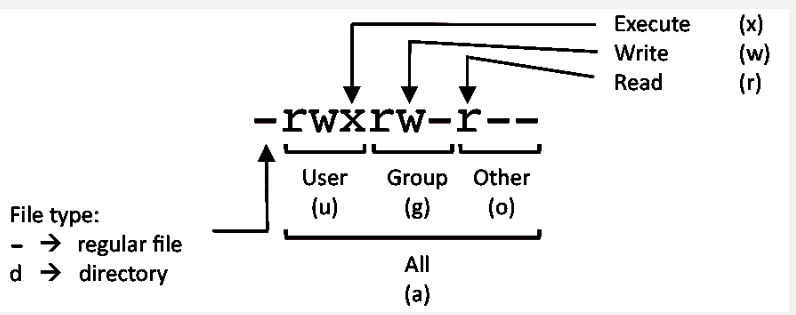
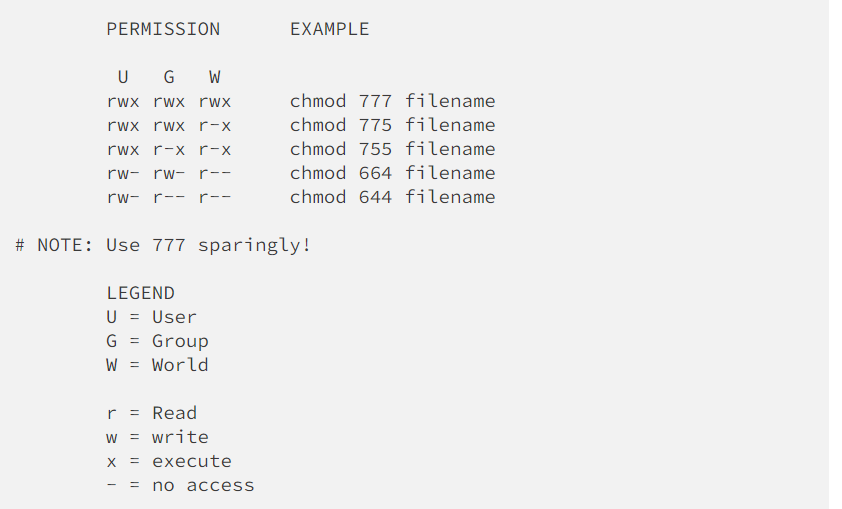
File Permission commands:
SYSTEM INFORMATION:
| uname -a | Display Linux system information |
| uname -r | Display kernel release information |
| cat /etc/os-release | how operating system information such as distribution name and version |
| uptime | Show how long the system has been running + load |
| hostname | Show system host name |
| hostname -I | Display all local IP addresses of the host. |
| date | Show the current date and tim |
| whoami | Who you are logged in as |
DISK USAGE:
df -h | Show free and used space on mounted filesystems |
df -i | Show free and used inodes on mounted filesystems |
du -sh | Display the total disk usage of the current director |
du -ah | Display disk usage for all files and directories in human-readable format |
fdisk -l | Display disks partitions sizes and types |
DIRECTORY NAVIGATION
| cd .. | To go up one level of the directory tree. (Change into the parent directory.) |
| cd | Go to the $HOME directory |
| cd ../.. | go back two-step back |
USER INFORMATION AND MANAGEMENT:
| id | Display the user and group ids of your current user. |
| last | Display the last users who have logged onto the system. |
| who | Show who is logged into the system. |
| w | Show who is logged in and what they are doing. |
| groupadd test | Create a group named "test". |
| useradd -c "John Smith" -m john | Create an account named john, with a comment of "John Smith" and create the user's home directory. |
| userdel john | Delete the john account. |
| usermod -aG sales john | Add the john account to the sales group |
Process command :
| ps | Display your currently running processes | |
| ps -ef | Display all the currently running processes on the system. | |
| ps -ef | grep processname | Display process information for process name |
| kill pid | Kill process with process ID of pid | |
| killall processname | Kill all processes named processname |
NETWORKING:
| ip a | Display all network interfaces and IP address |
| ping host | Send ICMP echo request to host |
| whois domain | Display whois information for domain |
| host domain | Display DNS IP address for domain |
| hostname -I | Display all local IP addresses of the host. |
SEARCH:
| grep pattern file | Search for pattern in file |
| grep -r pattern directory | Search recursively for pattern in directory |
| find /home/john -name 'prefix*' | Find files in /home/john that start with "prefix". |
| locate name | Find files and directories by name |
Thank you for reading! I hope you find this article helpful. Happy Learning :)